HighLevel AI receptionist: what it does, what it costs and how to set it up
Does HighLevel have an AI receptionist? Yes, Voice AI. What it can do on a call, real pricing, languages, and a step-by-step setup with a ready-made prompt.
 By Rana Jazib. Published . 7 min read.
Quick answer
- Yes. HighLevel's AI receptionist is called Voice AI. It can answer your business line, answer questions from your own knowledge base, book appointments, text callers and transfer calls to you.
- In my experience it's really good on calls and easy to set up. Most of the work is describing your business and connecting your calendar.
- It isn't included in the base plan. You pay per minute, or add HighLevel's AI Employee plan at $50 a month (100 minutes) or $97 a month (unlimited, fair use), plus phone charges.
HighLevel Voice AI at a glance
A capable AI receptionist that lives inside your CRM and calendar, so calls turn into booked jobs without copying anything between apps. Easy to set up if you know your own business rules.
Good fit if
- You miss calls after hours or while working and want them answered and booked
- You already use, or want, HighLevel for texts, calendar and follow-up
- You're happy to read a few call transcripts in the first week and fine-tune it
Look elsewhere if
- You only want call answering and nothing else (a standalone AI receptionist is simpler)
- Your calls need a person every time (complaints, complex quotes, sensitive situations)
- You need it to work on a phone line outside HighLevel or Twilio
Price Pay per minute, or $50/month (100 minutes) or $97/month (unlimited, fair use), on top of a HighLevel plan from $97/month. Phone usage extra.
Start the 30-day free trialAffiliate link. I earn a commission if you buy through it.
HighLevel’s AI receptionist is a feature called Voice AI, and if your business loses jobs to unanswered calls, it’s one of the most useful things HighLevel (gohighlevel.com) does. I’ve used HighLevel for years and set up its AI voice agent myself. It’s really good on calls and easy to set up. Here’s what it does, what it really costs and exactly how to set it up.
Does HighLevel have an AI receptionist?
Yes. HighLevel’s Voice AI is an AI agent that answers your business phone line. In HighLevel’s own words, it “answers your phone, qualifies callers, books appointments and takes action, 24 hours a day.” It works from information you give it about your business, and it’s connected to the same calendar, contacts and text inbox as the rest of your HighLevel account.
That last part is what sets it apart from a standalone answering app. When the agent books a job, the appointment lands in your calendar, the caller becomes a contact, and any follow-up texts come from the same system you already use.
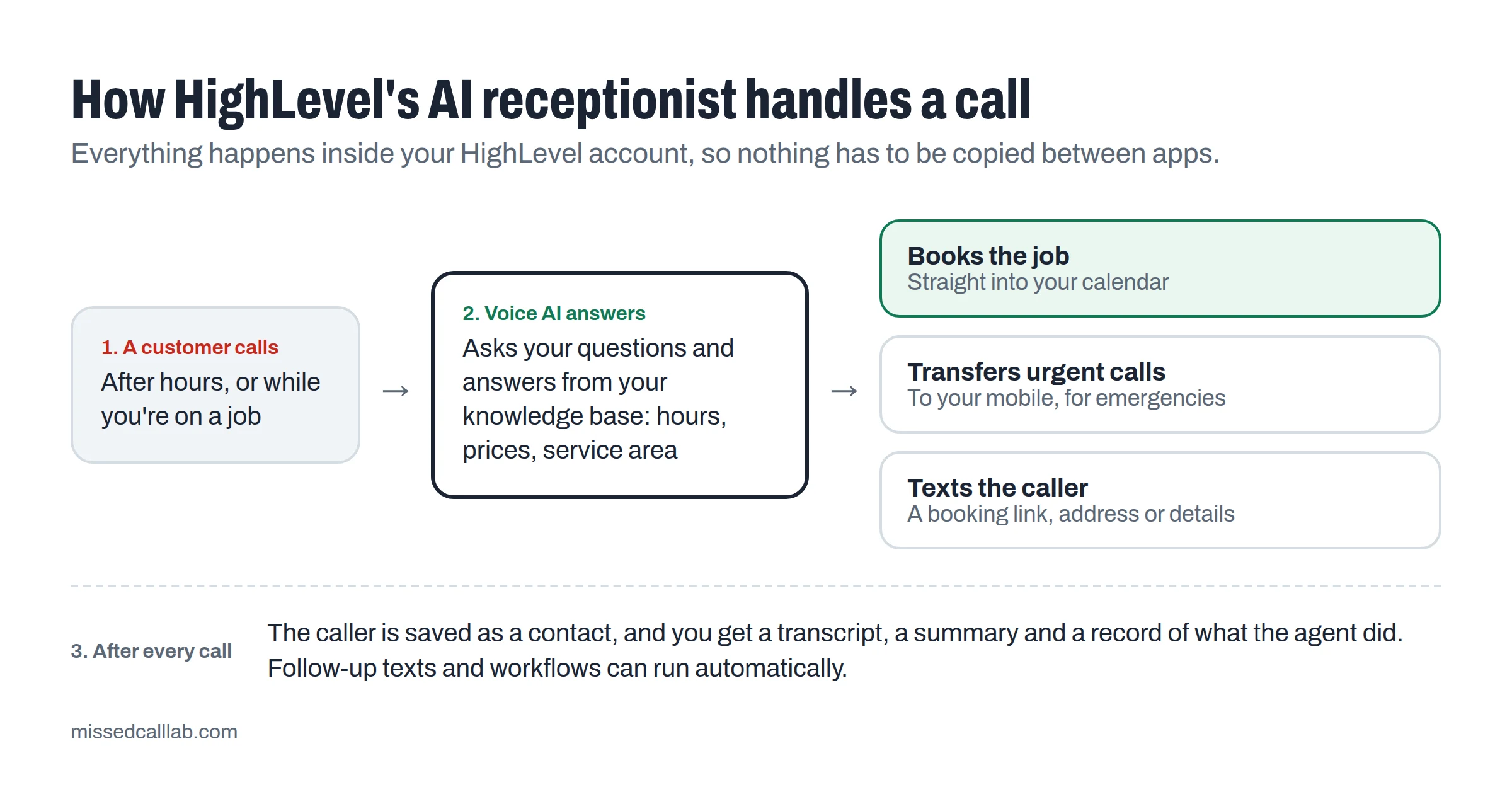
What it can do on a call
According to HighLevel’s help center, a Voice AI agent can:
- Answer questions from your knowledge base. Hours, services, prices, service area, policies and common questions. You decide what it knows.
- Book appointments straight into your calendar, offering available times as it goes. It can use one calendar or route bookings across several.
- Transfer the call to your mobile or another number when a person needs to take over.
- Text the caller during the call, for example a booking link or your address.
- Save the caller’s details, creating or updating the contact with name, email and address.
- Trigger a workflow, so anything else in HighLevel can happen next: a follow-up text, a task for your team or a new opportunity in your pipeline.
After the call, it can do more without interrupting the caller, such as sending a follow-up email or text and updating your pipeline. Every call shows up in the agent’s logs with a transcript, a summary and the actions it took.
Where it fits best
For most service businesses, the best use is the calls you can’t take now: after hours, weekends, and the times you’re on a roof, under a sink or with a customer. That’s also where missed calls hurt most. If you haven’t put a number on that yet, the missed-call calculator shows what those calls are worth to your business. Running an HVAC company? See how an AI receptionist should handle HVAC calls, including emergencies and gas-smell calls.
What HighLevel’s AI receptionist costs
Voice AI isn’t included in HighLevel’s base plans. You have three ways to pay, all on top of a HighLevel plan (from $97 a month):
| Option | What you pay | Worth it when |
|---|---|---|
| Pay per use | Voice engine $0.045 a minute, plus a voice charge of $0.015 to $0.17 a minute depending on the voice, plus AI model usage | Call volume is low or unpredictable. Usually the cheapest way to start. |
| AI Employee Growth | $50 a month, includes 100 AI agent minutes | You want a fixed monthly price. At 100 minutes, pay per use often costs less, so compare first. |
| AI Employee Unlimited | $97 a month, unlimited (fair use) | The agent handles a lot of minutes or uses premium voices, and you want simple budgeting. |
Phone charges apply on top in every case. Incoming calls are $0.01165 a minute in the US and Canada, and a local number is $1.15 a month.
A worked example. Say the agent handles 100 after-hours calls a month at 3 minutes each, so 300 minutes.
- On pay per use with HighLevel’s cheapest voices, that’s 300 × ($0.045 + $0.015) = $18, plus AI model usage and about $3.50 in call charges.
- With a premium voice at $0.17 a minute, it’s 300 × ($0.045 + $0.17) = $64.50, plus the same extras.
- On AI Employee Unlimited, it’s $97 flat, plus call charges.
HighLevel’s own example: a 10-minute call on its cheapest voice costs about $0.60 before AI model and phone charges. At low volumes, pay per use is usually cheapest. Once the agent handles many hundreds of minutes a month, or you use premium voices, the $97 unlimited plan is easier to budget.
Prices change, so check the current numbers on HighLevel’s plans and pricing before you decide. My HighLevel review has a worked example of a full month’s bill, including texting. To compare it with standalone services, see what an AI receptionist costs on per-minute, per-call and per-caller pricing, or put your own call numbers into the AI receptionist cost calculator.
How to set it up, step by step
You need a phone number inside HighLevel. Voice AI only works with numbers from HighLevel’s own phone system or a connected Twilio account. If you want the agent to send texts, the number also needs to finish carrier (A2P) registration first. HighLevel advises waiting until the number shows “A2P Verified” before sending texts.
- Create the agent. Go to AI Agents, then Voice AI, and click Create Agent. Start from a ready-made agent in the marketplace, build a custom one, or use the flow-based builder.
- Set the basics: name, voice, model, language and time zone. Then write the welcome message callers hear first, such as “Thanks for calling Rivera Plumbing. How can I help?”
- Write the prompt. This is where the agent learns its job. There’s a template below. HighLevel’s key advice is to tell the agent not to guess when it doesn’t have the information, and there’s a built-in Prompt Optimizer to tidy what you write.
- Add a knowledge base with your hours, services, prices, service area, policies and the questions customers ask most.
- Add actions: Appointment Booking (choose the calendar), Call Transfer (your mobile), Send SMS and Update Contact Field.
- Test it. Use Web Call to talk to the agent in your browser, then Phone Call to test a real call. Check the transcript, summary and actions after each one. Call transfer doesn’t run during a web call test, so test transfers with a real call.
- Deploy it. On the Deploy tab, pick the phone number and choose whether the agent answers calls directly or works as a backup. Then set its working hours, either all hours or a custom schedule such as evenings and weekends.
A prompt template for a service business
Copy this, then replace everything in [brackets]. Keep it in plain language, the way you’d brief a new receptionist.
You are the phone receptionist for [Business name], a [trade] business serving [areas]. You answer calls when the team can’t, mainly [after hours / during busy times].
Your goals, in order:
- Find out what the caller needs and whether it’s urgent.
- For emergencies such as [no heat, active leak, no power], collect their name, number and address, then transfer the call to [mobile number].
- For everything else, collect their name, phone number, address and a short description, then offer to book a visit using the calendar.
- Answer questions only from the knowledge base. If the answer isn’t there, say you’ll have the team follow up. Never guess prices or promise anything that isn’t in the knowledge base.
Be friendly, brief and clear. Confirm the booking details back to the caller before ending the call.
Tips from setting it up
- Start with after-hours only. Let the agent take evenings and weekends first, read its transcripts for a week, then decide whether it should also back you up during the day.
- Write prices as ranges with conditions (“diagnostic visit from $89, quoted on site”) so the agent never invents a number.
- Keep the knowledge base current. When your prices, hours or service area change, update it the same day.
- Make the emergency path short. Callers with a burst pipe want a person fast, so the transfer should come within the first minute.
HighLevel’s own pricing page says AI features need setup, configuration and ongoing human oversight. In practice that means the first-week check-ins above, not constant babysitting.
HighLevel Voice AI or a standalone AI receptionist?
Choose HighLevel’s Voice AI if you’ll use the rest of HighLevel too: missed-call text-back, the shared inbox, review requests and follow-up. Everything is connected, so a call can turn into a booked job and an automatic review request without extra tools.
Choose a standalone AI receptionist service, such as Smith.ai, Goodcall or Rosie, if all you want is call answering and you don’t plan to change how you manage customers. They’re built only for answering, which can mean less to set up.
Either way, start by working out what your missed calls cost. It tells you how much you can sensibly spend.
My verdict
HighLevel’s AI receptionist is one of the strongest reasons to use HighLevel if you run a service business. In my experience it’s really good on calls and easy to set up, and because it’s built into the same account as your calendar, contacts and texts, the calls it answers turn into booked work rather than messages to deal with later.
It costs more than the base plan suggests, so budget for AI minutes and phone usage. Give it a week of transcript reviews when you start. If that sounds right, you can start HighLevel’s 30-day free trial. My full HighLevel review covers everything else it does and who should skip it.
Questions people ask
Can HighLevel's AI receptionist make outbound calls?
Yes, with conditions. HighLevel's help center says outbound calling is for speech-to-speech agents and needs its approval and compliance setup, including an AI disclosure and a verbal opt-out. For most service businesses, answering inbound calls is the main use.
What languages does HighLevel Voice AI speak?
HighLevel lists a long range of supported languages, including Spanish, French, German and Portuguese. It also has a Multilingual voice option that currently covers English and Spanish.
Can I check what the AI said on each call?
Yes. HighLevel's Agent Logs show each call's transcript, a summary, the actions the agent took and, when recording is on, the recording. The summary can also be saved to the caller's contact notes.
Can I use my existing business phone number?
The agent answers on a number inside HighLevel, either one bought through HighLevel's phone system or a connected Twilio number. If customers already call a different number, look at moving or forwarding it to HighLevel before you switch the agent on.
Is there a free trial?
Yes. The standard trial on HighLevel's pricing page is 14 days, but signing up through HighLevel's Bootcamp page gives you 30 days plus a free live setup session. Usage charges for calls, texts and AI minutes can still apply during the trial.
Sources
- gohighlevel.com/voice-ai
- gohighlevel.com/pricing
- help.gohighlevel.com/support/solutions/articles/155000003911-overview-of-voice-ai-agents
- help.gohighlevel.com/support/solutions/articles/155000004107-how-to-create-voice-ai-agents
- help.gohighlevel.com/support/solutions/articles/155000004683-multi-language-support-for-voice-ai-agents
- help.gohighlevel.com/support/solutions/articles/155000006652-ai-product-pricing
- help.gohighlevel.com/support/solutions/articles/155000007687-voice-ai-agent-logs-and-call-details
- help.gohighlevel.com/en/support/solutions/articles/48001223556
- help.gohighlevel.com/support/solutions/articles/155000002380-what-is-a2p-10-dlc-brand-and-campaign-registration
Try HighLevel free for 30 days
Sign up through HighLevel’s Bootcamp page and you get a 30-day free trial (the usual trial is 14 days) plus a free live setup session that walks you through missed-call text-back. You can cancel during the trial without paying the subscription; call and text usage may still be charged.
Start the 30-day free trialAffiliate link. I earn a commission if you buy through it.